

|
|
|
|
In an effort to make market analysis as simple as possible, Aspen Graphics gives you the ability to define keystrokes in Aspen. Some keys, like F10 and ~ are not changeable, but all keystrokes that can be changed you will find in the Main Shortcut Keys window. To display the Main Shortcut Keys window, click on the Tools menu and choose Shortcut Keys...
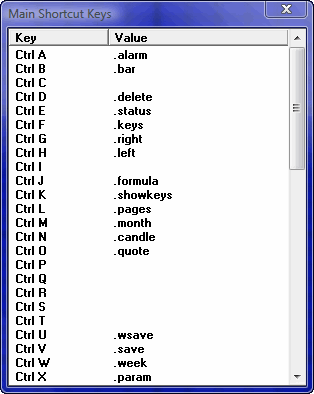
Many of the changeable keystrokes available in Aspen Graphics come pre-defined, but there's nothing to prohibit you from changing them. Some of the more frequently used keystrokes are summarized in the tables below.
Keystroke actions can be simple our complex. For example, you can define a keystroke to display a new chart, or you can make it display a chart, enter an instrument, split the chart, and display an RSI. is no mere You can create such compound actions by separating commands and symbols with semi-colons, which stand for the Enter key. For example,
cht_1;CMCSK;.candle;.split;.rsi
Associated with a keystroke, this shortcut will display a page called cht_1, enter the stock symbol for Comcast Corporation, turn bars into candlesticks, split the chart, and display an RSI in the new split. In this way, Shortcut Keys make your trading day easier.
|
Display the Main Menu |
Shift + ~ |
|
Display the menu for the active window |
~ |
|
Display the List of Pages |
Ctrl + L |
|
Display the Window Selection Menu |
.WIN then Enter |
|
Display the Formula Listing |
Ctrl + J |
|
Display the Alarm menu |
Ctrl + A |
|
Clear a Menu off the screen |
Esc |
|
Clear a Window off the screen |
Ctrl + D |
|
Clear the Status Window off the screen (the little window in the lower right corner of the screen) |
Ctrl + E |
|
Clear the cursor & the cursor window off a chart |
End |
|
Clear everything off the screen |
F3 |
|
Save as a Page |
Ctrl + v |
|
Save as a Window |
Ctrl + u |
|
Bring up a half-screen chart |
.DC then Enter |
|
Bring up a full-screen chart |
cht_1 then Enter |
|
Change to Candlesticks |
.CANDLE then Enter |
|
Change back to Bar Chart (also removes overlays) |
.BAR then Enter |
|
Change to Point & Figure |
.P&F then Enter |
|
Change to a tick chart |
0 then Enter |
|
Clear the cursor & cursor window off a chart |
End |
|
Change to daily time base |
Ctrl + Y |
|
Enter trend Mode |
Ctrl + F9 |
|
Clear data in a Quote Page |
,, then Enter |
|
Print the active window |
.PRINT then Enter |
|
Display the last command |
F12 |
|
Repeat the last command |
F12 then Enter |
©2008 Aspen Research Group, Ltd. All rights reserved. Terms of Use.